short mode
path includes {{query.file.path}}
tailscale basics
what’s the difference between tailscale and normal proxy
normal proxy:
- hub-and-spoke, requires a centralized server
- many proxies only ensures encryption to the proxy server, not end to end. tailscale:
- mesh network, devices connect directly to each other (point-to-point)
- built on top of WireGuard, lightweight tunneling protocol. ensures end-to-end encryption.
- NAT traversal
mesh network
tunneling in tailscale
-
[?] difference between tailscale tunneling and cloudflare tunnel? tailscale 的 tunnel 和 funnel 是怎么样的? cloudflare 的又是怎么样的?
-
[?] what does this mean?:
- Since encrypted communications don’t pass through a relay, and each server acts as its own VPN gateway - VPN from the couch to the office and HQ · Tailscale Docs
ip masquerading
Ip masquerading is also known as network address translation, which is used to modify IP packet headers while they’re in transit. It allows multiple devices on a private network to connect to the internet using a single public IP address.
→ Claude
what is firewall-cmd --permanent --add-masquerade doing?
- configure firewall to enable IP masquerading permanently
- i.e., telling firewall to allow network address translation for outgoing packets.
why do subnet router and exit node need IP masquerading(NAT) enabled?
- subnet router is like a router, it connects two or more subnets, where devices have different range of ip address
- so subnet routers need to perform NAT (again, just like a router!), to map a packet’s destination ip and source ip, so it knows how to send the response packet back
- the NAT performed by subnet router is Source NAT by default.
- exit node does NOT perform NAT!
- exit nodes are more just like a proxy (simply forwarding, without packet transformation*)
- although it’s not performing NAT, it still needs ip masquerading enabled for some issue.
Note
*: actually exit node has two modes: kernel and user.
- in kernel mode (linux root), kernel simply forwards packets, nothing else is done, all IP protocols are supported.
- in user mode (non-linux or linux non-root), exit node terminates TCP/UDP connections from the original connecting tailnet peer, and starts a new outbound connection with the target, in other words, stitching two connections (so, not “simply forwarding”).
subnet router
Subnet routers allow you to access devices on a physical subnet through your Tailscale network without installing the Tailscale client on each device. → Tailscale AI
- 这里主要讲的是, 一个物理 subnet 里, 有一个 device 是这个 subnet 的 router, 不在这个 物理 subnet 里的设备, 就可以通过这个 subnet router 来访问这个 subnet 里的其他设备 (其他设备上没有 tailscale)
They act as gateways that relay traffic from your tailnet to a physical subnet.
- subnet router 可以把一个 subnet 的 inbound traffic 给 route 进 subnet
The exit node is designed to route traffic to the public internet, not specifically to internal subnet.
- 公司的 git 不是在 public internet 上的, 是在 internal subnet 里的
Cloud network integration—seamlessly connect cloud VPCs or other cloud network segments to your Tailscale network. → Subnet Routers | Tailscale Explained
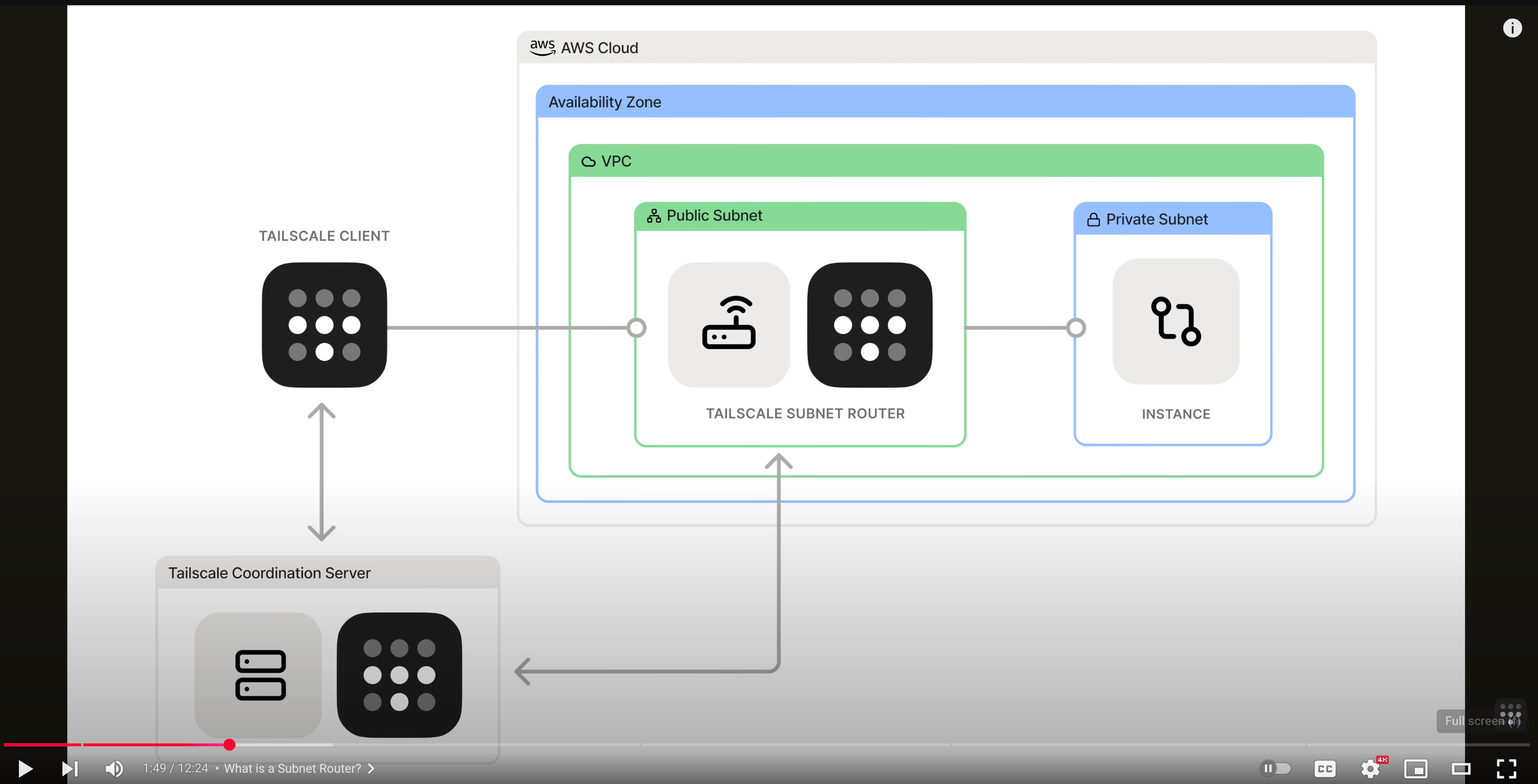
流程
tailnet-subnet-router.excalidraw
⚠ Switch to EXCALIDRAW VIEW in the MORE OPTIONS menu of this document. ⚠ You can decompress Drawing data with the command palette: ‘Decompress current Excalidraw file’. For more info check in plugin settings under ‘Saving’
Excalidraw Data
Text Elements
physical subnet
machine A
machine B
…
tailscale subnet router
other network
machine C with tailscale installed
machine D
tailnet
data packet
machine A has no idea that the traffic comes from another subnet, they can only see that traffic comes from subnet router
Qn: how does machine C know where to send packet if it wants to connect to machine A?
Ans: subnet router is advertising to the whole tailnent:
“i have 192.168.16.0/24 in my physical network, connect to me if you wanna connect to them”
Ans: the packet already contains machine A’s private ip, so subnet router just forwards directly to machine A
this only works if machine C already knows machine A’s ip (private ip in its physical network) what if dns is needed?
Route DNS lookups to an internal DNS server
of course, when these two subnets are not directly connected, there’s no way machineC could just send packets to subnet router (it doesn’t even know what’s the subnet router’s ip!) the process is more like this:
tailnet
machine C with tailscale installed
tailscale subnet router
tailscale server
Link to original
- tailnet 里的其他设备 (不在同一个 physical network 的 machine C) 想要给 machine A 发消息
- 一些问题:
- machine C 怎么知道要发给哪个 IP?
- 可能是通过某种方式知道的(e.g., 口口相传), 也可能是通过 DNS
- 如果是 DNS 的话, 那前提是要配置 dns, 让 machine C 的 dns 请求能够发现到 machine A
- subnet router 会给 tailscale advertise 自己的 subnet range (e.g., 192.168.1.0/24)
- tailnet 里的其他设备会通过 control panel 知道, 如果要给 IP 为 192.168.1.0/24 这个 range 里的设备发消息, 就先发给 subnet router (i.e., 目标如果在 range 里, 下一跳是 subnet router)
- subnet router 收到一个 packet 的时候, 就会查自己的 routing table, 根据 routing table 来转发
- subnet router 在 advertise subnet range 的时候, 就应该是 advertise routable ip range
- 不然收到一个自己也不知道怎么 route 的 packet, subnet router 也转发不了
- 在这之前, 首先 subnet router 要 enable 自己的 ip forwarding
- machine C 怎么知道要发给哪个 IP?
ip packet 是怎么变化的
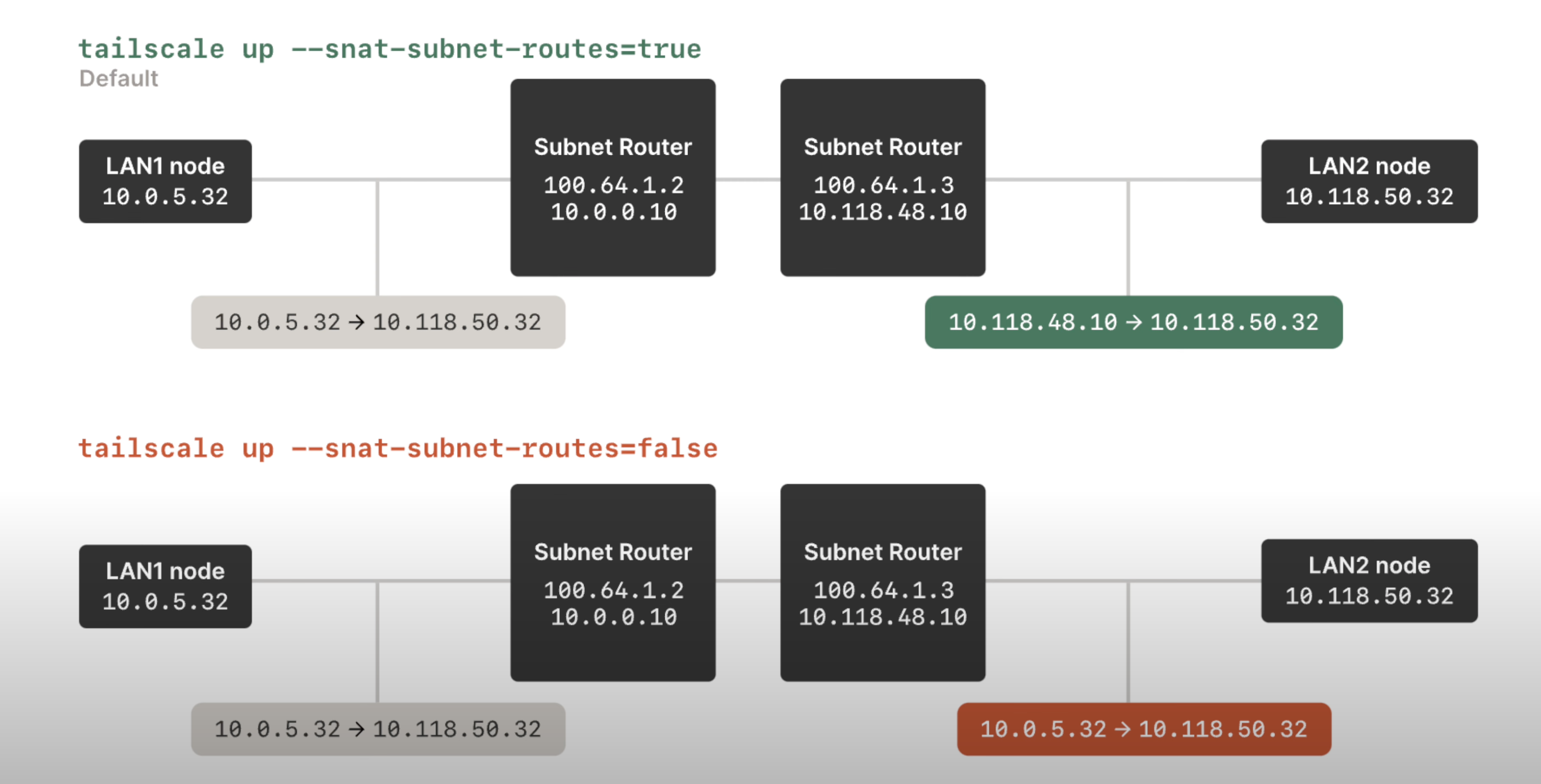
- 从
10.0.5.32 -> 10.118.50.32可以看出, LAN1 node 在发送的时候, 已经知道 LAN2 node 的 private IP 了 - 有 SourceNAT 的情况下, subnet router 就会把 ip packet 的 src IP 改成自己的
- 没有 SourceNAT 的情况下, subnet router 不做任何 modification, 直接转发
Note
NAT 不是一定会发生的, 即便是在普通的 routing 情况下, 比如 routing.excalidraw 里的
ip packet 3, 可以有 SNAT, 也可以没有!
问题:
- 在上面那张图里, SNAT 是哪个 router 执行的?
- 本身 Source NAT 的功能: 改变 IP packet 里的 source IP address
- 目的: 使得一个内网里没有 公网 ip 的机器能够和
- SNAT 本身的意义是什么, 什么时候需要 SrcNAT, 什么时候需要 DstNAT?
- 像 tailscale 这样 setup 自己的 tailnet, 是不是没有必要使用 DstNAT? 如果用了 DstNAT, 是不是单纯自己给自己找麻烦呢?
- NAT 是出 subnet 的时候 perform 的吧? 还是进 subnet 的时候?
其他
subnet router to forward packets
subnet router 要允许 ip forwarding, i.e., config itself to be able to act as a router
echo 'net.ipv4.ip_forward = 1' | sudo tee -a /etc/sysctl.d/99-tailscale.conf
echo 'net.ipv6.conf.all.forwarding = 1' | sudo tee -a /etc/sysctl.d/99-tailscale.conf
sudo sysctl -p /etc/sysctl.d/99-tailscale.conf
tailscale client to accept advertised routes
- 在 tailscale client (不是 subnet router) 上执行
sudo tailscale up --accept-routes, 来接受其他 tailscale client advertise 的 ip range - more like “—accept-advertised-routes-from-other-subnet-routers”
- site-to-site networking 这里的解释感觉更充分一点: “The
--accept-routesflag accepts the advertised routes of all other subnet routers in the tailnet.”
Site-to-site networking
- with subnet routers set up in each physical subnet, they connect multiple subnets that are not physically connected requirements:
- 这些 subnet 里不能有 overlapping 的 CIDR range setup 流程:
- 两个 subnet 分别 setup tailscale 的 subnet router
- admin panel accepts advertising
- 这两个 subnet 里的 device 要主动地修改自己的 routing config
- 这两个 subnet 里的 devices, 除了 subnet router, 其他都没有装 tailscale, 所以需要自己修改自己的 routing table
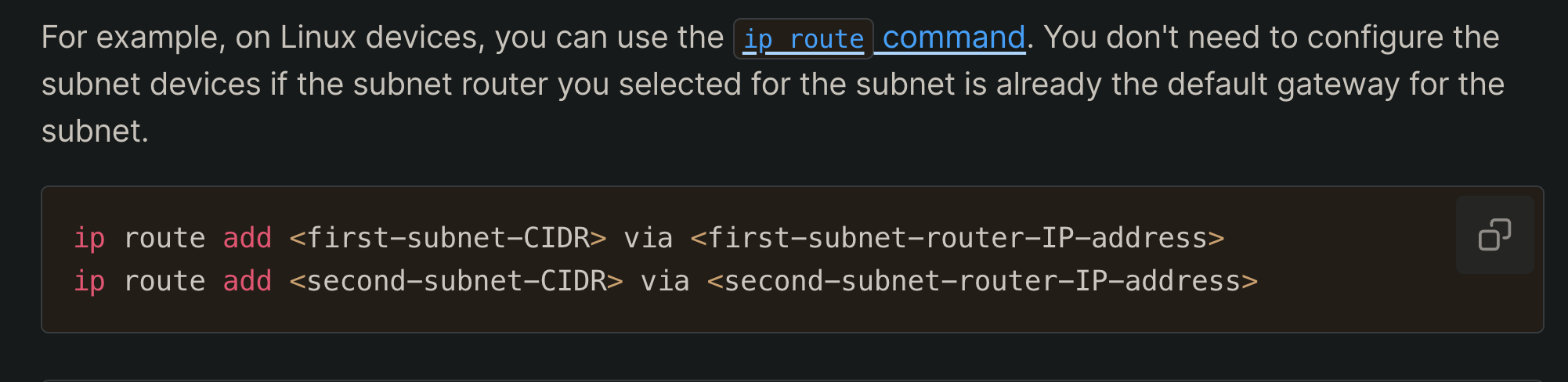
- 这两个 subnet 里的 devices, 除了 subnet router, 其他都没有装 tailscale, 所以需要自己修改自己的 routing table
- 假设要连接
192.0.2.0/24和172.16.100.0/24,192.0.2.0/24里的设备 (192.0.2.2 是 subnet router) :
ip route add 100.64.0.0/10 via 192.0.2.2  # tailnet 的 traffic (tailnet 里设备的地址都是 100.x.y.z)
ip route add 172.16.100.0/24 via 192.0.2.2  # 要连接的那个子网的 ip 地址
图解:
site-to-site-networking.excalidraw
⚠ Switch to EXCALIDRAW VIEW in the MORE OPTIONS menu of this document. ⚠ You can decompress Drawing data with the command palette: ‘Decompress current Excalidraw file’. For more info check in plugin settings under ‘Saving’
Excalidraw Data
Text Elements
subnet router
device A
subnet 1: 192.0.2.0/24
subnet router
device B
subnet 2: 172.16.100.0/24
no tailscale installed
no tailscale installed
ip: 192.0.2.2
ip: 172.16.100.2
ip: 172.16.100.10
ip: 192.0.2.3
device A → device B
device A needs to be manually config-ed: ip add 172.16.100.0/24 via 192.0.2.2
because of this config, ip packet is sent to subnet router
if subnet router IS the default gateway (normal router in graph) then we don’t need this config
dst ip shouldn’t exist in subnet 1, otherwise this device with this ip in subnet 1 might never be reached; since traffics reaching him all get directed to tailnet
normal router
2
3
1
src IP: 192.0.2.3 dst IP: 172.16.100.10
dst IP is already deviceB
172.16.100.10
if there”s another 172.16.100.10 existing in the subnet, and every device in the subnet has set up routing config, then this device will not be reacheable
ip packet traffic
src IP: 192.0.2.3 dst IP: 172.16.100.10
src IP: 192.0.2.2 dst IP: 172.16.100.10
or
src ip could be either deviceA or its subnet router, depending on whether SourceNAT is enabled
src IP: 192.0.2.3 dst IP: 172.16.100.10
src IP: 192.0.2.2 dst IP: 172.16.100.10
or
src ip could be either deviceA or its subnet router, depending on whether SourceNAT is enabled
Link to original
exit node
Exit nodes route all your internet traffic (on a device) through a specific device in your Tailnet. They function more like a traditional VPN endpoint.
- 一个设备接入了一个 Tailnet 之后, 就可以选择把这个 device 的所有 outbound traffic 都先发到 exit node, 再由 exit node 发到外网
- 发向 exit node 所在的 VPC 也是可以的
配置了 exit node 之后, tailnet 的设备能进入 exit node 的 LAN 吗?
- 不可以, exit node 是收到 connecting devices 的 traffic 之后是向外 (public network) 转发, 不是向它自己的 LAN 转发
LAN access
By default, exit nodes don’t have access to a connecting device’s local network. If you want to allow direct access to your local network when routing traffic through an exit node, enable exit node local network access. Official doc
exit-node-lan-access.excalidraw
⚠ Switch to EXCALIDRAW VIEW in the MORE OPTIONS menu of this document. ⚠ You can decompress Drawing data with the command palette: ‘Decompress current Excalidraw file’. For more info check in plugin settings under ‘Saving’
Excalidraw Data
Text Elements
subnet 1
device
device
device
deviceA
subnet 2
exit node
device
device
printer
tailnet
traffic
!!
this traffic become problematic, because all non-Tailscale traffic is routed to exit node, this traffic from device A to its local network’s printer is also routed to exit node, but exit node does NOT have access to subnet 1 (deviceA’s LAN) hence we need to allow LAN access
this traffic isn’t possible with exit node, an exit node doesn’t grant connecting devices access to the exit node’s LAN
Link to original
exit node & subnet router
direction of traffic:
- exit nod. handles outbound traffic to the public internet
- subnet router handles inbound traffic to specific sub-networks scope:
- exit node handles all non-Tailscale traffic
- 这里的 non-Tailscale traffic 的意思是, 两个 tailnet device 之间的对话, 就不会转发到 exit node, 再从 exit node 出去;
- tailscale traffic:
tailnet device A -> tailnet device B - non-tailscale traffic:
tailnet device A -> exit node -> non-tailscale server
- subnet router handles only the traffic to the advertised subnets
用 exit node 访问 VPC:
While technically an exit node might work for accessing a VPC (since it routes all traffic), it’s not the recommended approach because:
- It’s inefficient - you’d be routing all your internet traffic through the company device, not just the VPC traffic
- may violate company policies by using their device as a general internet gateway
- subnet routers are specifically designed for this use case and provide more granular control → tailscale ask AI.
VPC is different from LAN!
- despite Exit Node routes all non-Tailscale traffic from connecting devices and provides access to VPN, it doesn’t provide connecting devices access to its LAN
- VPC
Exit Node is NOT a subset of subnet router!!
tailscale dns
MagicDNS
automatically registers DNS names for devices in your network.
- 把 tailnet 里的 device 的 tailnet ip 都 map 成 device name
taiscale up [...] --accept-dns=falseto disable magicDNS on a specific device- 这条命令是在 tailnet 里的设备上跑的, 不是在 subnet router / exit node 这些跑
--accept-dns=true: 告诉 tailscale client, 用 admin console 上配置的 dns rules, 包括:- magicDNS、global nameserver、split DNS
我现在已经在用 magic DNS 了, 为什么 tailscale dns status 返回的结果是没有 resolver ?
tailscale dns status返回的 resolver, 是 admin console 里配置的 global nameserver- 因为我没有配置 global nameserver, 所以这个 command 返回的 resolver 就是空的
- dns lookup 的时候就会用系统的 dns 配置
- magicDNS 和 splitDNS 是某些特定的 dns query 的规则, 不是这里说的 resolver
Secure Your Network with Tailscale DNS and MagicDNS:
Instead, when your local Tailscale is configured with a map of your tailnet, it is pushed all of the private DNS names your computer has access to. In addition to there being no external service that can log your private name lookups, there is an extra benefit to a push-based DNS database for small networks (where “small” means “not billions”): no TTL.
- 一台设备加入 tailnet 之后, 不是主动地去 pull magicDNS config, 而是 server push 下来
- tailnet 相关的 dns query 在本地设备上就能够被 quad100 的 stub resolver 给 resolve; 更安全, 更快
- 为什么不需要 TTL:
- 传统的 dns 是 client 通过 dns query 获取到 dns resolution 的结果, 然后根据 TTL 缓存在本地
- 现在是 tailnet coordination server 主动给 tailnet 里的每台设备 push, 所以对于 tailnet 里的设备来说, 每一条 dns record 的 TTL 是 forever until new pushes from coordination server
- 只要 tailnet 里的 dns config 有变动 (设备改名, 新设备加入 etc), tailscale coordination server 就会给 tailnet 里的所有设备都 push changes
Nameservers
- restricted nameserver: only applies to DNS queries matching a specific search domain. also known as split DNS
- e.g., to only use
1.1.1.1as nameserver to look upexample.com
- e.g., to only use
- global nameserver: handles NDS queries for any domain.
我已经 setup 了用 10.65.8.20 来作为 company.com 的 nameserver, 为什么 nslookup company.com 的时候还是 100.100.100.100 作为 nameserver?
- 在设备连接 tailnet 的时候 (或者说在 tailscale client 启动了的时候), 都是用
100.100.100.100(Quad100) -
“It operates locally on your device and handles DNS resolution for both Tailscale-specific domains and regular internet domains” → Tailscale AI
“Tailscale runs a DNS server built-in on every node, running at
100.100.100.100.”
→ 实际上是有个 local dns resolver 的 service 跑在 quad100 . 个地址了
- quad100 根据 admin console 的 rule 来 forward dns query
- 在 admin console 的 split DNS 只是一个 rule
- 如果一个 queried domain 没有配置 rule, quad100 就把这个 query 发给 OS 的 default 配置
- 在 tailscale client 启动的时候, quad100 就成了所有 dns resolution 的 entry point 了
- quad100 上的 local dns resolver 是个 stub resolver (section 6.1.3.1)
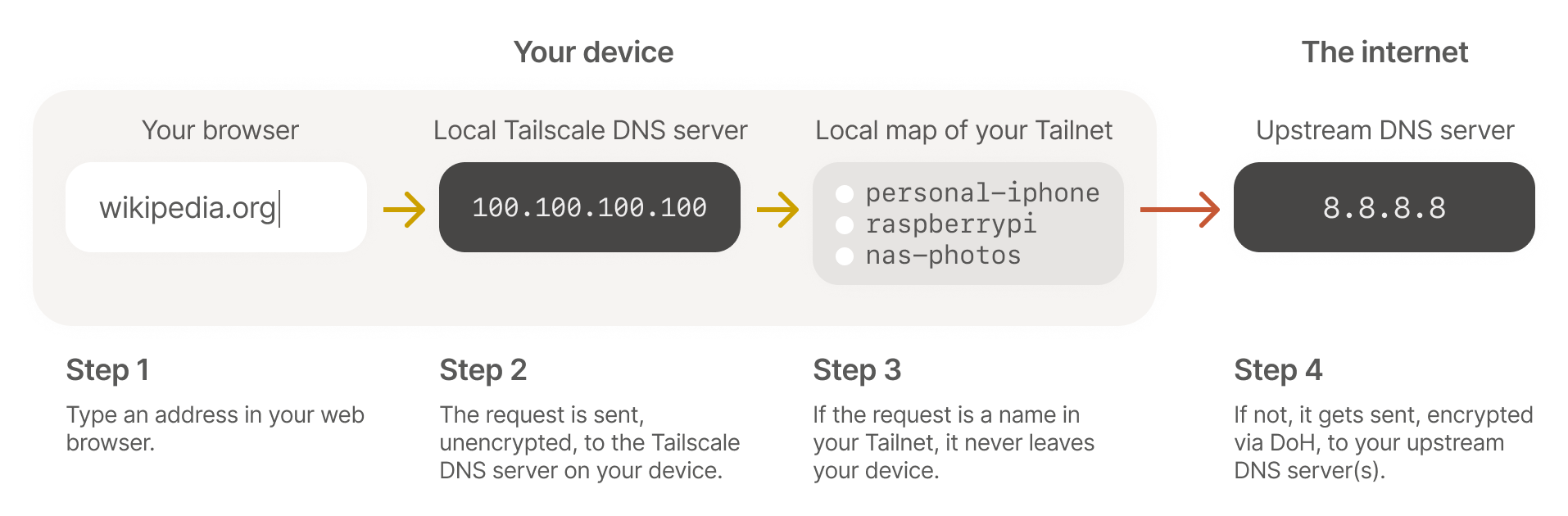
nameserver redundancy:
It’s best practice to use more than one global nameserver (which can be from the same provider) to ensure redundancy. However, keep in mind that using multiple global nameservers can bypass explicit content restrictions if they aren’t the same across all the nameservers.
- 在配置 nameserver 的时候, 我们想要 redundancy, aka, 配置多个 nameserver
- 这样如果一个 nameserver fail 了, 还有其他的 nameserver 可以查询
- 但这样会出新的问题: 如果用 dns 来实现 content filtering, 那不同的 nameserver 可能会有不同的 filtering policy
- 一个 dns query 可能会被 google 屏蔽, 但不会被 cloudflare 屏蔽, 这样就会出现 inconsistency
override dns servers:
- tailnet 里的设备默认是使用自己的 local dns settings, 如果要这些设备都用 tailscale 上 self define 的 nameserver, 要允许
override dns servers - 防止 tailnet 里的设备用自己的 nameserver
- 使用场景: 用 pi-hole 自己搭一个 dns server, 然后希望 tailnet 里的所有 device 都用这个 dns server 来实现 adblock, 那就要 override tailnet 里所有 device 的 local dns server
- 这个 pi-hole 设备自己要设置
--accept-dns=False, 不然就 dns loop (所有设备都用 pi-hole device 作为 dns server, pi-hole 设备也把自己当成 dns server) 了
- 这个 pi-hole 设备自己要设置
multiple VPNs
“two VPNs may fight for routing tables on the system” → tailscale github issue