cs186berkeley
- https://cs186berkeley.net/notes/
- https://archive.org/details/UCBerkeley_Course_Computer_Science_186/Computer+Science+186+-+2015-01-22-FGvKL2cmZEo.mkv
- https://www.youtube.com/watch?v=d3bsAeo0e8U&list=PLzzVuDSjP25SJBxWLPfYLwGlOPHmKL775&index=2
database hierarchy
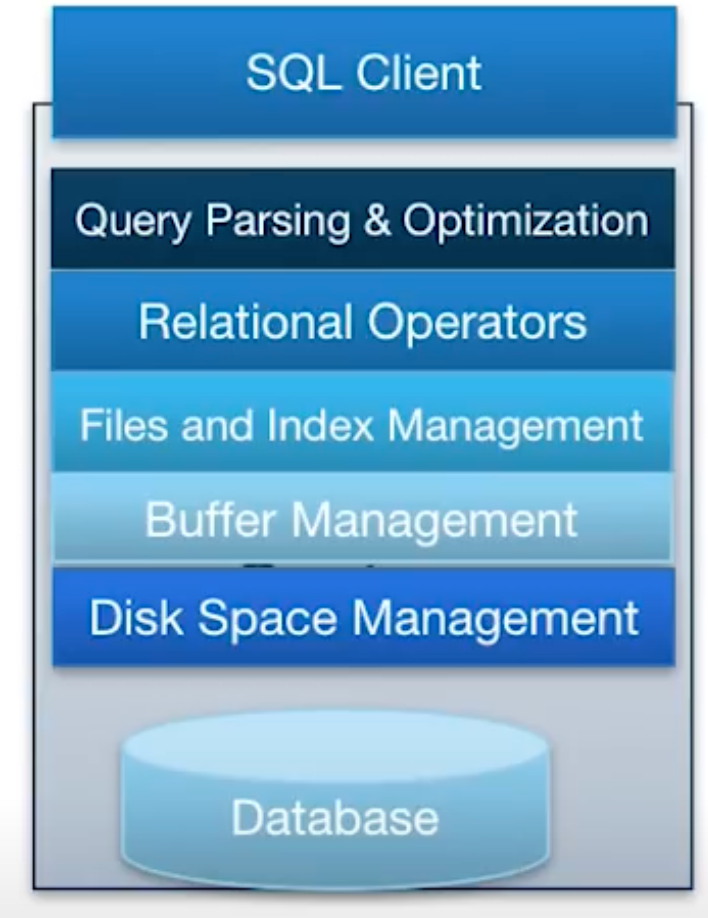 source CS186
disk and files and buffers
the disk offers APIs to operating system: READ and WRITE, which basically means transferring data from RAM to disk or from disk to RAM. The unit of the size of this data transfer is page, aka block A page, or a block, is normally a 64~128 KB object.
The basic unit of data for a relational database is record (a row in the table), records are organized into relations (which is just another name for tables) The basic unit of data for disk is page
But we cannot address a specific bit or byte on the disk. In other words, there’s no pointer reference to a location on the disk.
what happens on the disk for READ/WRITE
- seek time: moving arm to position disk head on track
- rotational delay: waiting for block to rotate under head
- transfer time: moving data to or from disk surface
how does a magnetic disk work?
- 磁盘, “磁”, 依靠电磁感应原理
- on the disk, there’re magnetic grains;
- electric current are used to change the direction of the magnets
- this way, information of 1s and 0s are converted and saved in the form of different magnetic fields (direction of the magnetic grains) on the surface of the disk
- what these two videos for visualization (watch in order):
hard disk, ssd
- the above discussion was on hard disk, aka magnetic disk
- ssd doesn’t work that way; SSD is short for solid state disk, also called flash