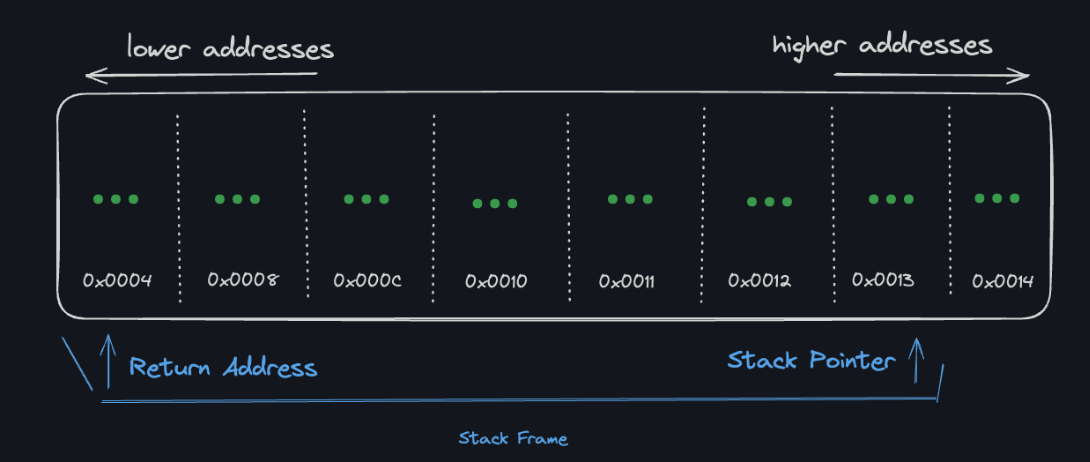
Word
a word is a processor’s natural unit of data.
Struct
human level: grouping fields together machine level: grouping memory together
a named set of values that occupy a block of memory. … A struct occupies a contiguous block of memory, → struct (C programming language)
Data structure alignment
for the below struct:
typedef struct Human{
    char first_initial;
    int age;
    double height;
} human_t;
in memory it would be:
source: boot.dev 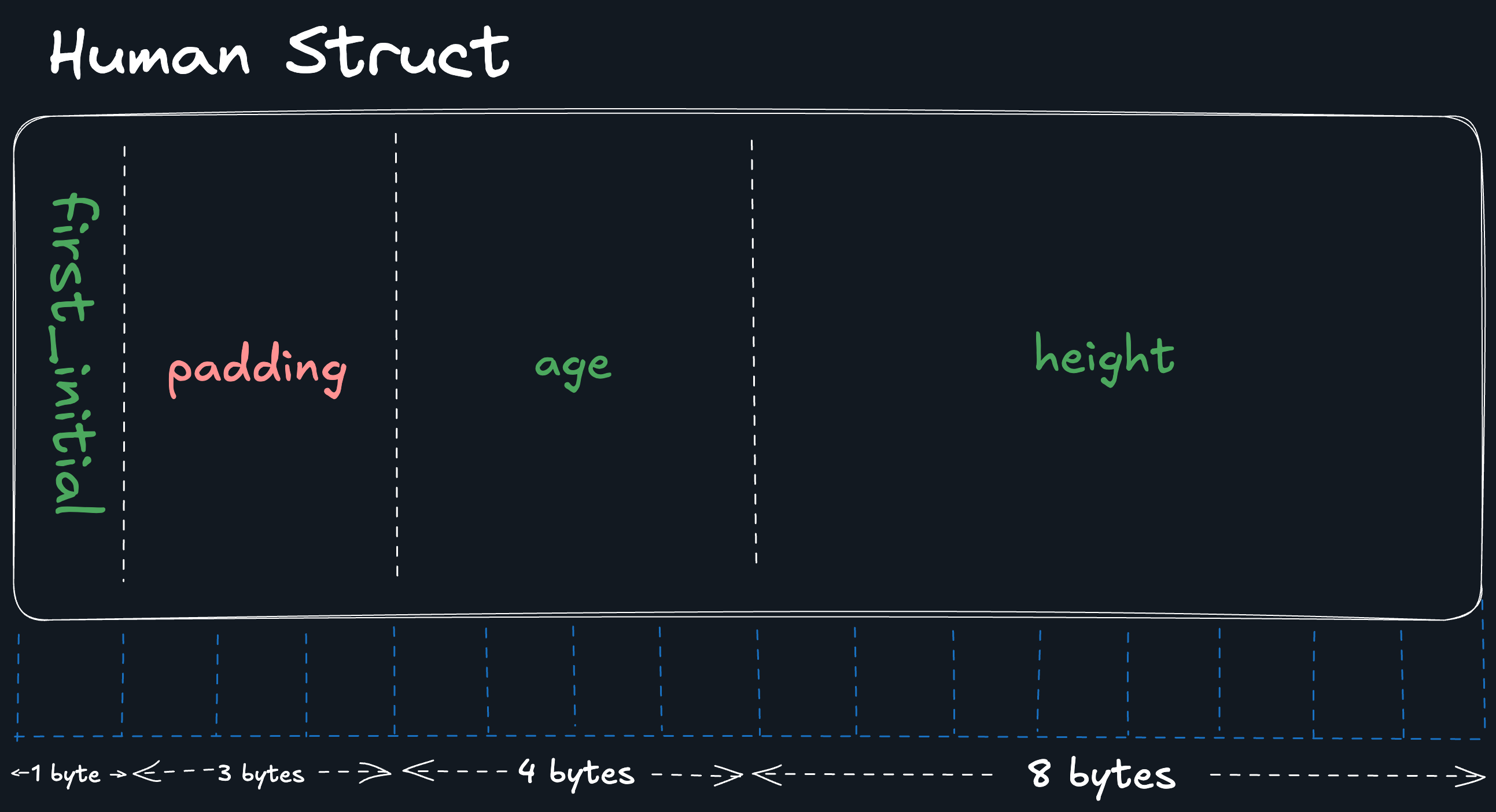
- 32 bit processor processes memory in a group of 32 bits (4 bytes)
- for memory size smaller than 32 bits, it adds padding
- as a general rule of thumbs, ordering fields in a struct from largest to smallest will help the compiler minimize padding.
array
an array name acts as a pointer to the first element of the array
given an array, the variable name points to the first element of the array:
int my_array[3] = {1, 2, 3};
int *arr_ptr = my_array;
// below 3 lines print out the same thing.
printf("using variable name with index %d\n", my_array[1]);  // first element
printf("using variable name with dereference %d\n", *(my_array+1));  // my_array + 1, next address
printf("using pointer %d\n", *(arr_ptr+1));  // arr_ptr points to the first element of the array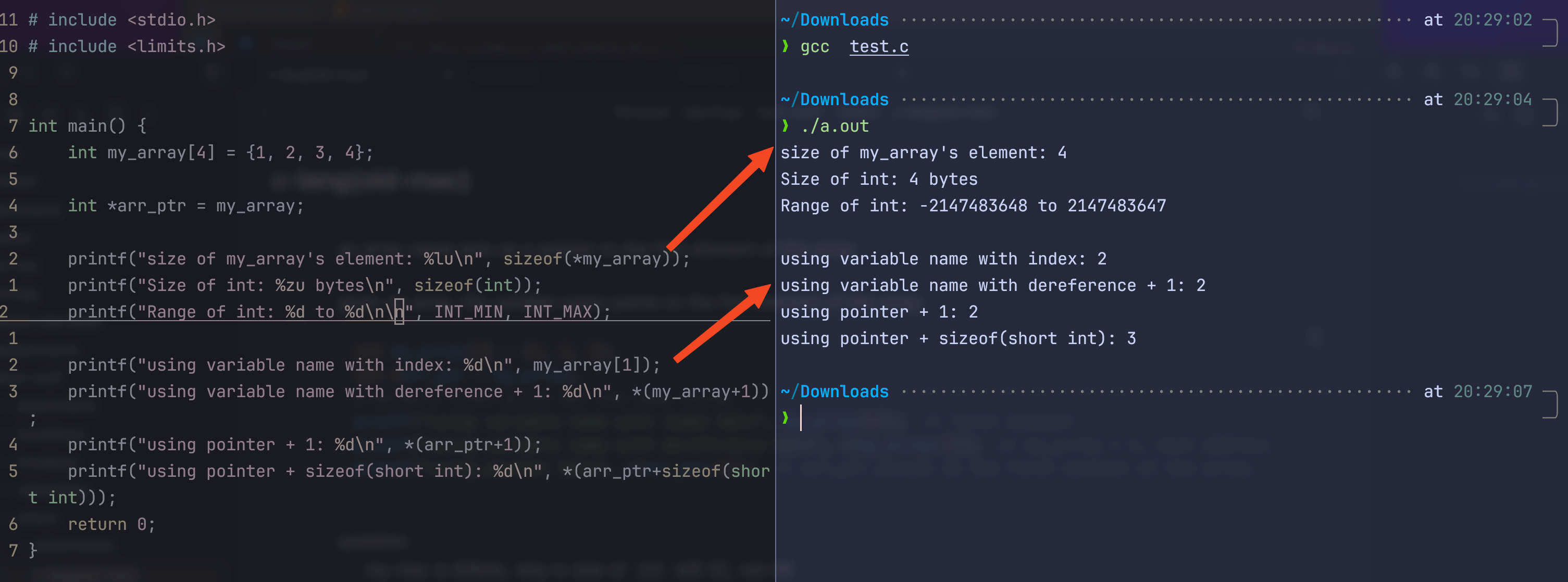
question:
- my mac is 64bits, why is size of
intstill 32, not 64- for
int, even on 64-bit system, it’s still common to be 32 bits (4 bytes)
- for
- why is the next element
arr_ptr + 1, notarr_ptr + sizeof(int)? i mean, as the table below, different between two addresses issizeof(int), it’s not1, right?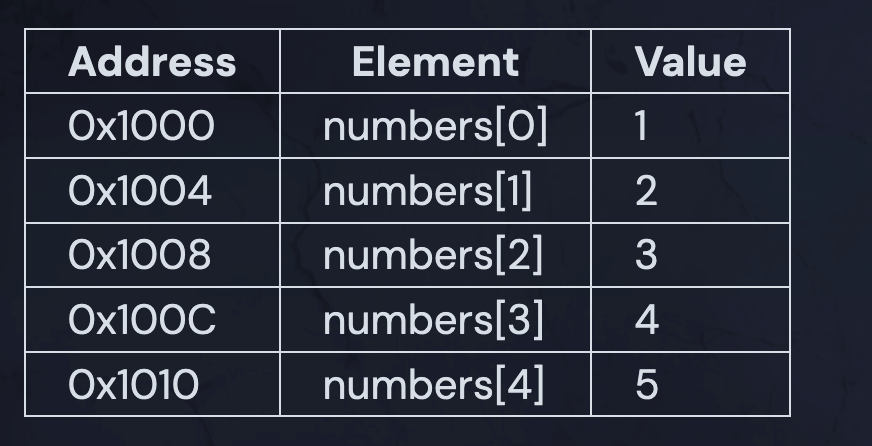
-
“When you use pointer arithmetic on arrays, C automatically scales the addition by the size of the element type. This is a key feature of pointer arithmetic in C.” → claude
*(arr+1)is the same asarr[1]
-
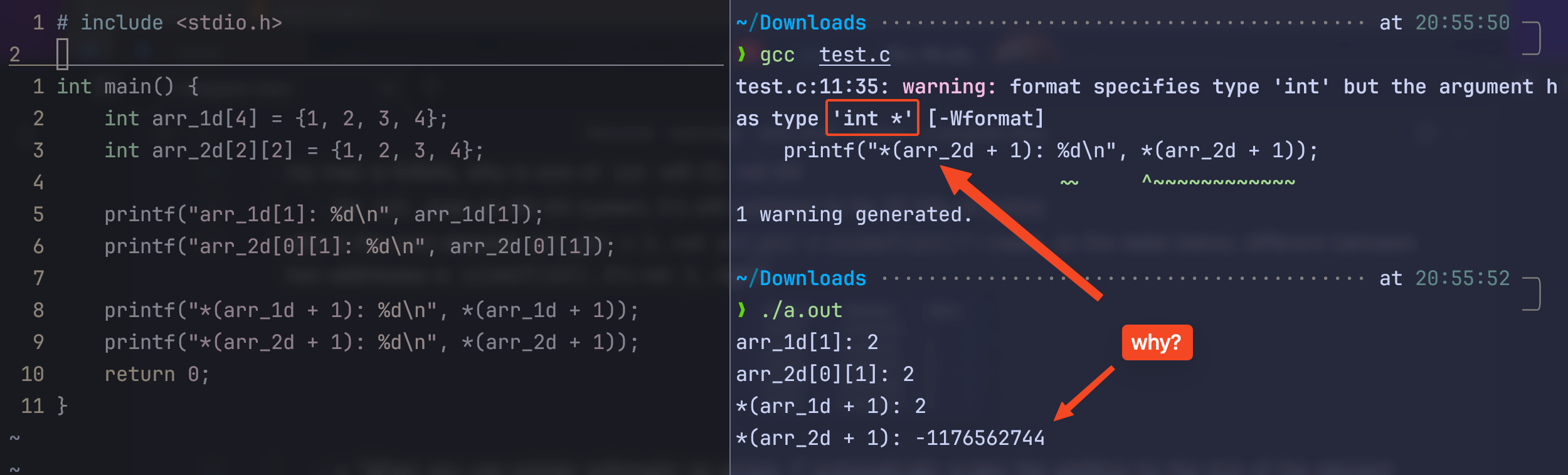
2-d arrays are different:
int my_arr[2][2] = {1, 2, 3, 4};
printf("my_arr[1][1]: %d\n", my_arr[0][1]);
printf("*(my_arr+1): %d\n", *(my_arr+1));
THIS DOESN’T WORK, compiling throwing warning:
warning: format specifies type 'int' but the argument has type 'int *
-
because of ^pointer-scaling, for 2d array,
array_namepoints to the first row of the array, not the first element -
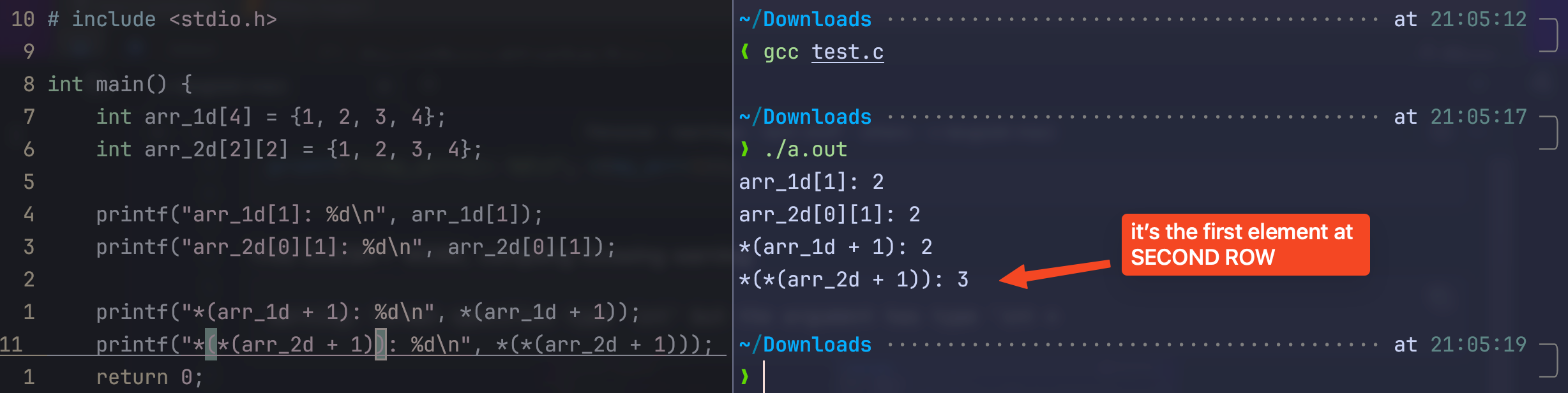
if i wanna point to the element, i need to dereference twice
-
how it’s dereferenced matters!
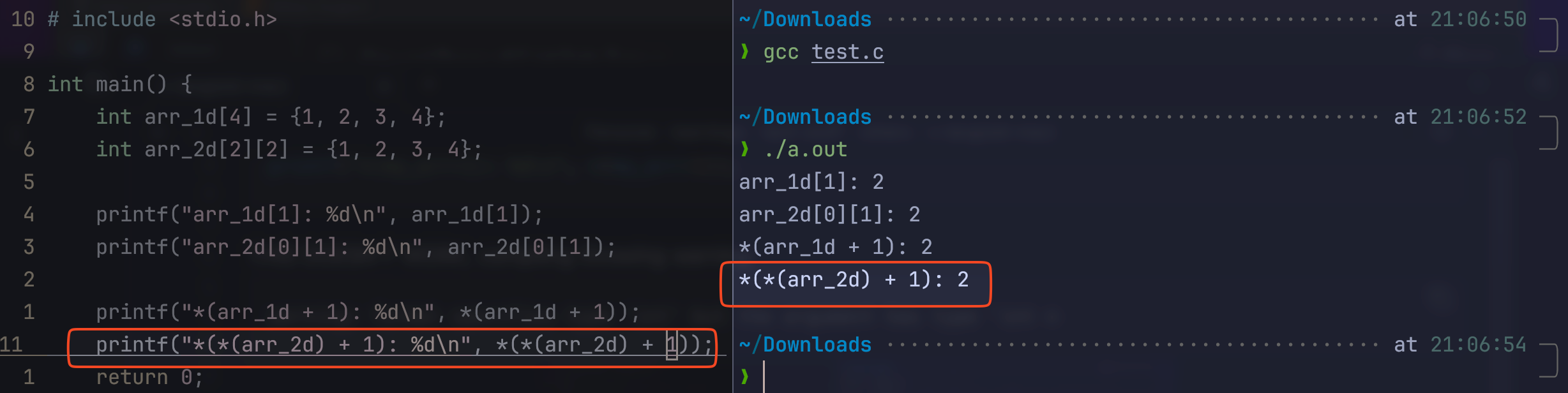
*(*(arr_2d + 1)): arr_2d points to the first row; here it firstly plus 1, leading it to point to second row, dereferenced again, then it points to first element of second row*(*(arr_2d) + 1): arr_2d points to the first row; here it firstly dereferenced, leading it to point to first element of first row, then +1 makes it points to the second element of first row, then it’s dereferenced again to get the value
-
so to visualize this is (should revisit and fact check myself):
^potential-bad-example2d-array-and-struct.excalidraw
⚠ Switch to EXCALIDRAW VIEW in the MORE OPTIONS menu of this document. ⚠ You can decompress Drawing data with the command palette: ‘Decompress current Excalidraw file’. For more info check in plugin settings under ‘Saving’
Excalidraw Data
Text Elements
arr_2d: [1, 2], [3, 4]
0x0000
0x0004
0x0008
0x000C
Point points[2]
“points” points to
0x0000
0x0004
0x0008
0x000C
struct Point: int x int y
Link to original -
so in a sense:
arr_2dpoints to the first row, which then points to the first element of first row (pointing twice, hence double dereference is needed) -
another way to approach this is to type cast, i.e., convert a pointer to an array to a pointer of integers
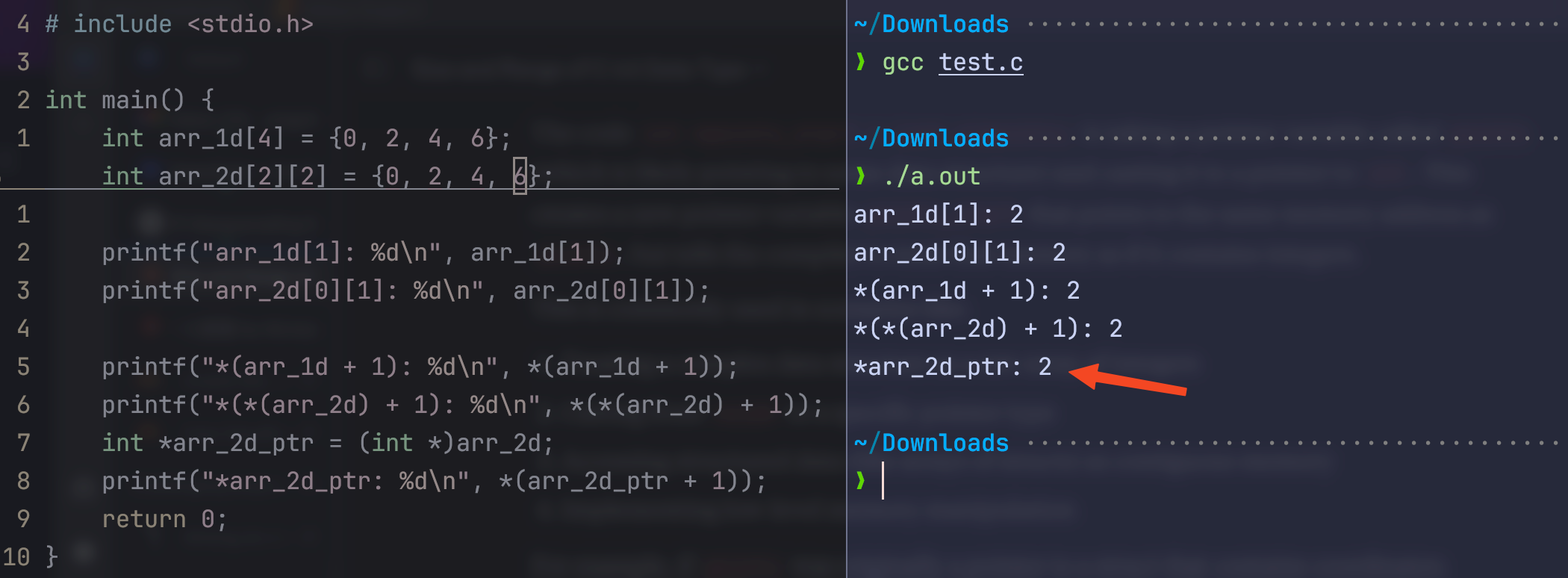
- NOTE: this is type cast, not dereference!
“The cast
(int *)pointsdoesn’t dereference the pointer - it simply tells the compiler “treat this pointer as if it’s pointing to integers.” No actual memory access or dereferencing occurs during the cast operation.
Bothpointsandpoints_startwill point to the same memory address after this operation. The difference is that:
pointshas its original type (which could be a pointer to a struct, a void pointer, etc.).points_startis an integer pointer that points to the same location”
→ claude
-
this is getting messy, let’s revisit sometime
-
what is it that
*(arr_2d+1)is printing out then? it’s even different every time: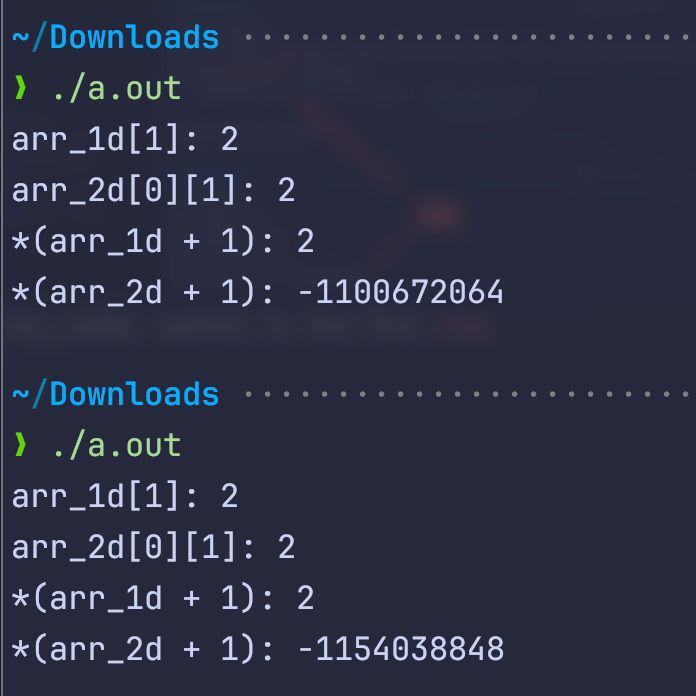
array are like pointers
- the variable holds the address to the first element of the array, but it does not exactly behave like a pointer
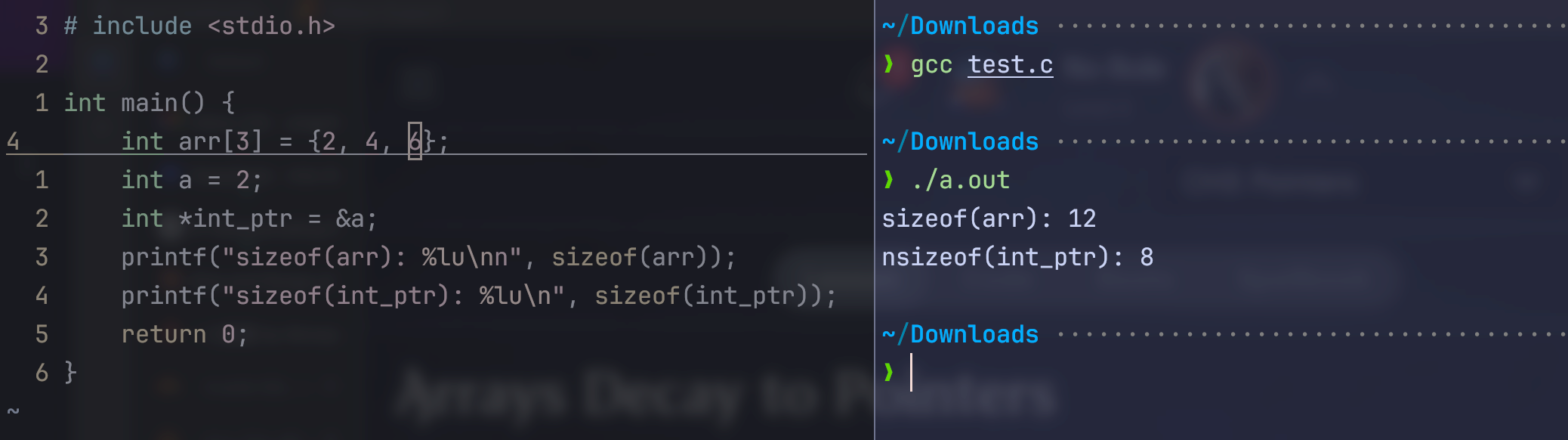
- as shown here, size of
arris the size of the whole array (3ints, hence 12 bytes) - but the size of
int_ptr(an literal pointer) is 8 bytes -
“In many contexts, arrays decay to pointers, meaning the array name becomes “just” a pointer to the first element of the array.” → boot.dev
- arrays and structs are not the same either, the example here might be very wrong lol
- as shown here, size of
When Arrays Don’t Decay
sizeofOperator: Returns the size of the entire array (e.g., sizeof(arr)), not just the size of a pointer.&Operator Taking the address of an array with&arrgives you a pointer to the whole array, not just the first element. The type of&arris a pointer to the array type, e.g.,int (*)[5]for anintarray with 5 elements.- Initialization: When an array is declared and initialized, it is fully allocated in memory and does not decay to a pointer. → boot.dev
array casting
^array-casting this is also a potentially very bad example. it deals with array of array, which is a bit more confusing. so let’s just follow the example and start with array of struct first.
typedef struct Point {
	int x;
	int y;
} point_t

point_t points[3] = {
	{1, 2},
	{3, 4},
	{5, 6},
};- in this example,
pointsis an array of struct. - the variable
pointspoints to the the firstrowof the array, not the firstelementof the firstrow- so
printf("%d", points.x)gives error;printf("%d", points[0].x)is correct
- so
int *int_ptr = (int *)points;- when we do this, we type cast a pointer_to_array to a pointer_to_int
- so the pointer
int_ptrpoints to an integer, not a row; it points to the first element in the first row
strings
Note
string is just pointers.
char *string→ pointer
write a str_cancat function that:
- concatenate 2 strings in place
- by finding the null terminator of str1
- iterating over str2 and copy each char to the memory locations at the end of str1
- and adding a null terminator at the end of the concatenated string
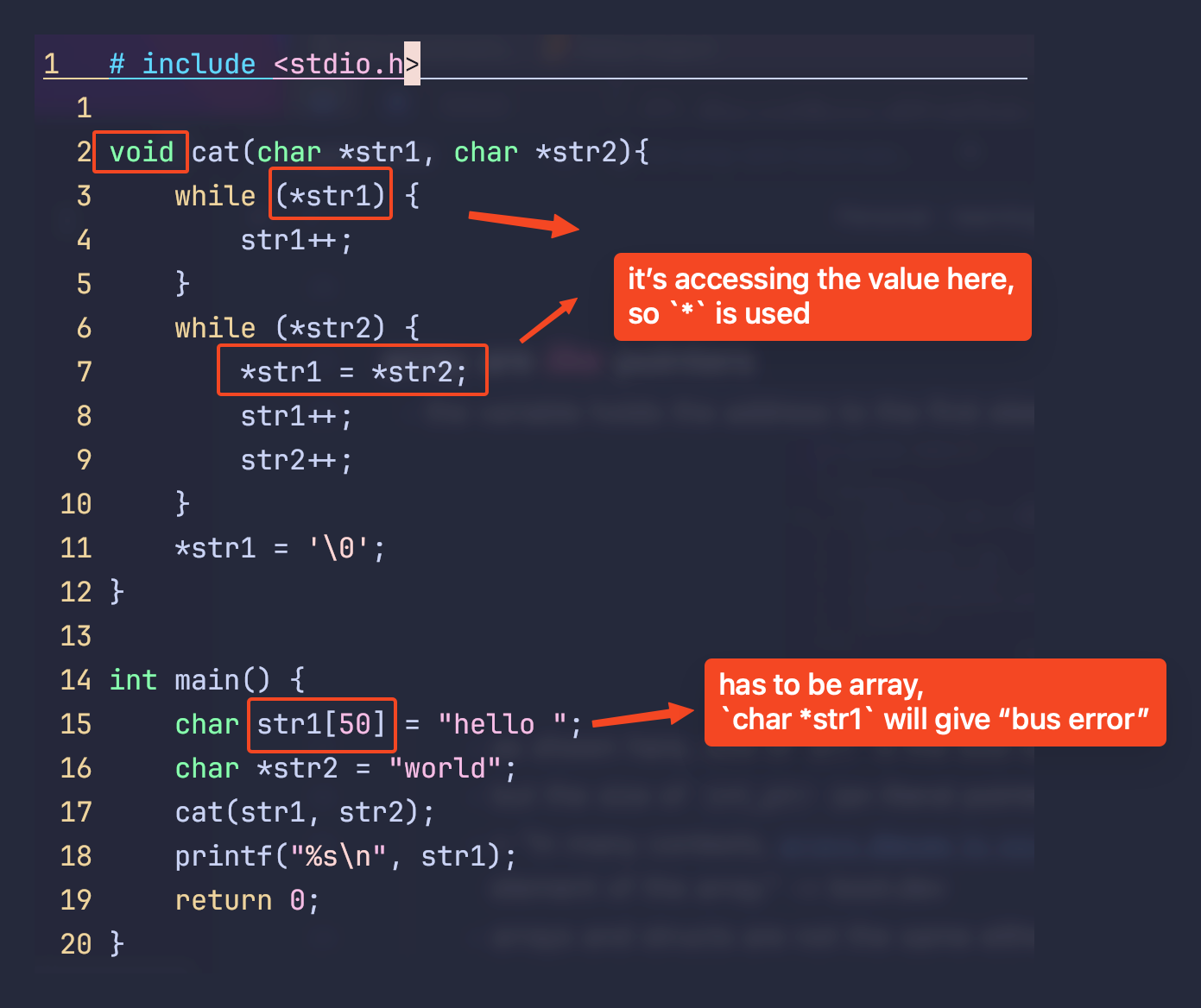
- memory allocation when executing
char *str = "abc":- firstly, 4 bytes of memory is allocated for
abc, 1 byte for each character and 1 byte for null terminator- also, it’s read-only!
str[2] = 'a'is NOT POSSIBLE, it gives Bus error
- also, it’s read-only!
- second, the variable
stritself is a pointer, typically 8 bytes, a memory is allocated for it- it contains the address of the first memory allocated above (pointing to where the string is)
- two separate memory allocations happen here
- firstly, 4 bytes of memory is allocated for
stack
for function:
void create_typist(int uses_nvim) {
  int wpm = 150;
  char name[4] = {'t', 'e', 'e', 'j'};
}
when it’s called, the memory layout is: